




Two of the most commonly used connection protocols are PPPoE (Point-to-Point Protocol over Ethernet) and IPoE (Internet Protocol over Ethernet).
While both protocols serve the same purpose—providing internet connectivity—they operate differently and offer unique advantages. Understanding these differences helps ISPs, network administrators, and even broadband users make informed decisions about their network infrastructure.
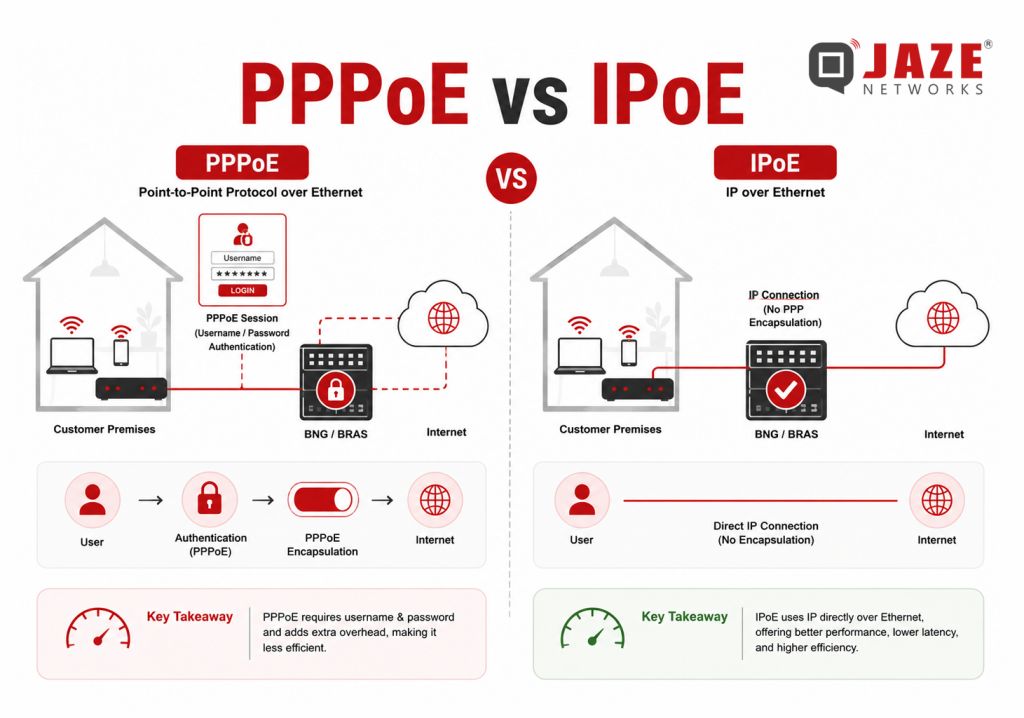
PPPoE, or Point-to-Point Protocol over Ethernet, is a protocol that combines the Point-to-Point Protocol (PPP) with Ethernet networks. It was originally designed to support broadband services such as DSL and later became widely used by fiber ISPs as well.
With PPPoE, subscribers must authenticate using a username and password before accessing the internet. Once authenticated, a dedicated session is established between the customer’s router and the ISP’s Broadband Network Gateway (BNG). This session-based approach allows ISPs to manage subscribers individually for authentication, accounting, bandwidth control, and billing.
IPoE, short for Internet Protocol over Ethernet, is a newer and simpler method of delivering internet connectivity. Instead of requiring login credentials, IPoE automatically assigns an IP address using DHCP (Dynamic Host Configuration Protocol).
The connection process is faster because there is no authentication handshake or session establishment. This makes IPoE particularly suitable for modern fiber broadband, IPTV services, and high-speed residential networks. Many next-generation broadband deployments now prefer IPoE due to its simplicity and improved efficiency.
Although both protocols deliver internet access, they differ in several important areas.
The most noticeable difference is how users are authenticated.
For ISPs, PPPoE provides stronger per-user authentication, while IPoE simplifies the customer experience.
PPPoE establishes a dedicated session before transmitting data, which introduces additional processing.
IPoE eliminates this extra step, allowing devices to receive an IP address almost immediately after connecting to the network. This results in quicker connection times and lower processing overhead.
PPPoE adds an additional protocol header to every packet, reducing the standard Ethernet Maximum Transmission Unit (MTU) from 1500 bytes to 1492 bytes. Although the performance impact is usually small, it can become noticeable in high-speed networks.
IPoE uses the full Ethernet MTU and avoids extra encapsulation, making it more efficient for gigabit and multi-gigabit broadband services.
Modern broadband networks often serve thousands—or even millions—of subscribers.
Since PPPoE maintains individual sessions for every user, network devices must manage significantly more session information.
IPoE is largely stateless, making it easier for ISPs to scale their infrastructure while reducing the processing load on Broadband Network Gateways (BNGs).
Many ISPs now offer IPTV alongside broadband services.
IPoE supports multicast traffic more efficiently through technologies such as IGMP, allowing multiple users to receive the same video stream without duplicating traffic.
PPPoE can support IPTV, but multicast delivery is generally less efficient and often requires additional configuration.
| Feature | PPPoE | IPoE |
| Full Form | Point-to-Point Protocol over Ethernet | Internet Protocol over Ethernet |
| Authentication | Username and Password | DHCP-based |
| Connection Type | Session-based | Connectionless |
| MTU Size | 1492 Bytes | 1500 Bytes |
| Performance | Slight protocol overhead | Lower overhead |
| Scalability | Moderate | High |
| IPTV Support | Limited multicast efficiency | Native multicast support |
| Best For | DSL, legacy broadband, controlled subscriber management | Fiber broadband, IPTV, high-speed networks |
PPPoE continues to be widely used because it offers several operational benefits for ISPs:
For networks where subscriber authentication and billing accuracy are top priorities, PPPoE remains a reliable choice.
IPoE has become increasingly popular due to its simplified architecture and improved efficiency.
Its benefits include:
These advantages make IPoE an excellent option for modern fiber access networks.
There is no universal answer because the right protocol depends on network design and operational requirements.
PPPoE is often preferred when ISPs require strict subscriber authentication, detailed accounting, and session-based policy control. Many legacy DSL deployments and existing broadband infrastructures continue to rely on PPPoE because it integrates seamlessly with established AAA systems.
IPoE is generally better suited for new fiber deployments, GPON, XGS-PON, and large-scale broadband networks where simplicity, scalability, and higher throughput are key priorities. It also delivers a smoother experience for subscribers by eliminating manual login requirements.
Both PPPoE and IPoE are proven technologies that continue to play important roles in broadband networking. PPPoE offers strong authentication, granular subscriber management, and robust billing integration, making it valuable for many existing ISP environments. IPoE, on the other hand, delivers faster connections, lower protocol overhead, and greater scalability, making it the preferred choice for modern fiber broadband networks.
Whether your network runs on PPPoE, IPoE, or a combination of both, your BSS/OSS platform should be capable of managing subscribers seamlessly across either deployment. Jaze ISP Manager is designed to integrate with leading BNGs and access networks, enabling ISPs to manage subscriber authentication, billing, bandwidth policies, and service provisioning from a single platform. This gives operators the flexibility to support existing PPPoE subscribers while smoothly adopting IPoE as their networks evolve.
Click here to learn more.
For most people, accessing the Internet is as simple as connecting to Wi-Fi or switching on mobile data. Within seconds, websites load, videos stream, and messages are delivered across the world. But behind every click lies a sophisticated infrastructure that spans continents and connects thousands of independent networks.
Contrary to popular belief, the Internet is not a single network owned by one company or government. Instead, it is a global ecosystem of interconnected networks, each managed independently but designed to work together. Internet Service Providers (ISPs), backbone carriers, Internet Exchange Points (IXPs), and routing protocols all play a vital role in ensuring data reaches its destination quickly and reliably.
Understanding how these components interact provides valuable insight into how the Internet functions at scale.
The Internet is built on thousands of Autonomous Systems (AS). An Autonomous System is a collection of IP networks managed by a single organization under a unified routing policy. Every major ISP, cloud provider, content platform, and enterprise network typically operates its own Autonomous System and is identified by a unique Autonomous System Number (ASN).
For example, telecom operators, cloud providers, and global technology companies each maintain their own AS, allowing them to exchange routing information with other networks across the Internet.
Instead of one central authority deciding where traffic should go, every Autonomous System communicates with neighboring networks to determine the best available path for data. This decentralized architecture is one of the reasons the Internet remains scalable, resilient, and capable of handling billions of connected devices.
When a user types a website address into a browser, the request does not travel directly to the destination server. It passes through multiple interconnected networks before reaching the hosting provider and returning the requested content.
This journey is made possible by the Border Gateway Protocol (BGP), often referred to as the routing protocol of the Internet.
BGP enables Autonomous Systems to exchange information about available network routes. Each network advertises the IP address ranges it can reach, allowing neighboring networks to build routing tables and determine the most suitable path for Internet traffic.
The chosen route is not always the shortest in terms of physical distance. Instead, BGP considers routing policies, network availability, commercial agreements, and overall path efficiency. If one route becomes unavailable due to maintenance or an outage, traffic can automatically be redirected through an alternate path, helping maintain uninterrupted connectivity.
Not all Internet Service Providers perform the same role within the Internet ecosystem. They are broadly categorized into different tiers based on the scale of their infrastructure and how they exchange Internet traffic.
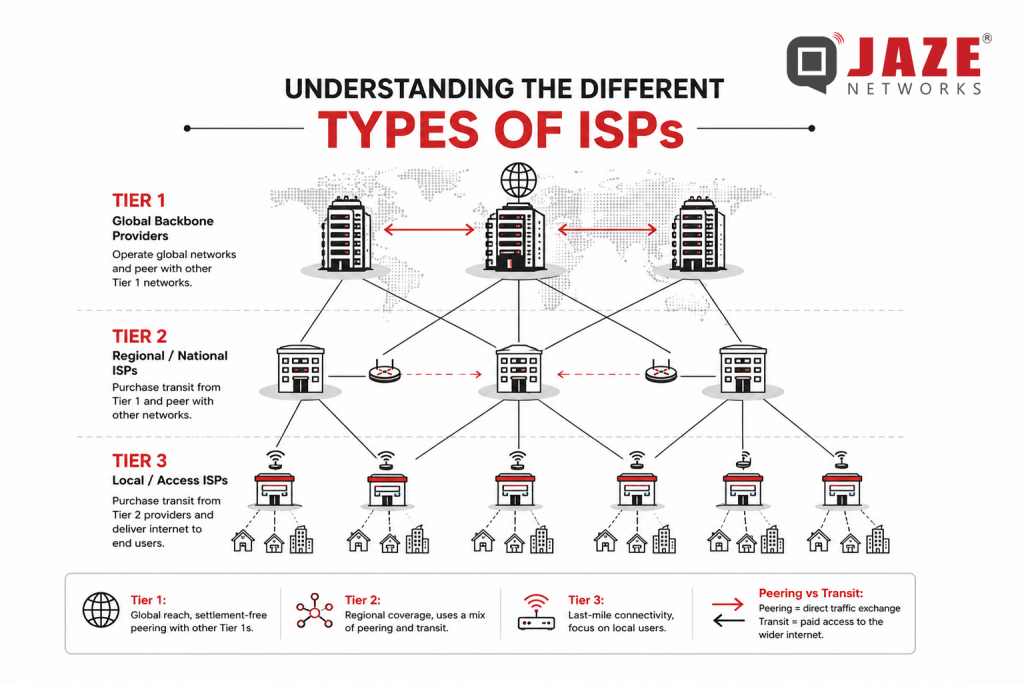
Tier 1 providers operate global backbone networks and exchange traffic directly with other Tier 1 providers without paying transit fees. They form the core of the global Internet.
Tier 2 providers combine direct peering with transit services purchased from larger networks. Many national telecom operators fall into this category, balancing operational efficiency with broader connectivity.
Tier 3 providers are typically regional or local ISPs that deliver Internet services directly to residential and business customers. These providers obtain upstream connectivity from larger networks while focusing on customer service, last-mile connectivity, and subscriber management.
Although this hierarchy simplifies the Internet’s structure, modern connectivity is far more interconnected than a strict three-tier model.
One of the key reasons the Internet operates efficiently is the relationship between peering and IP transit.
Peering is an agreement between two networks to exchange traffic directly, reducing unnecessary routing through third-party providers. This helps improve performance while lowering bandwidth costs.
IP transit, on the other hand, allows a network to purchase access to the wider Internet through an upstream provider. Smaller ISPs often rely on transit services to reach destinations beyond their own network.
Internet Exchange Points (IXPs) further improve efficiency by providing a neutral location where multiple ISPs and network operators can exchange traffic locally. In India, organizations like the National Internet Exchange of India (NIXI) enable domestic Internet traffic to remain within the country whenever possible, reducing latency and improving user experience.
Today, a significant portion of Internet traffic comes from streaming platforms, cloud applications, software updates, and social media services.
Instead of serving every request from a central data center, many companies use Content Delivery Networks (CDNs) to distribute content across multiple geographic locations. Frequently accessed content is cached closer to users, reducing the distance data must travel.
When users watch a video or download an application, the content is often delivered from the nearest CDN server rather than the original source. This minimizes latency, reduces congestion on backbone networks, and provides faster loading times.
CDNs have become an essential component of modern Internet infrastructure, supporting everything from video streaming and gaming to software distribution and enterprise applications.
As broadband adoption continues to grow, Internet Service Providers are expected to manage far more than network connectivity alone. They must handle subscriber onboarding, service provisioning, billing, customer support, complaint resolution, payment collection, regulatory compliance, and business reporting—all while maintaining consistent service quality.
This increasing operational complexity makes integrated management systems just as important as reliable network infrastructure. Streamlined workflows, centralized data, and real-time visibility enable providers to improve efficiency, reduce manual effort, and deliver a better customer experience.
The Internet is a remarkable example of global collaboration, built on thousands of interconnected networks working together through standardized protocols and shared infrastructure. From Autonomous Systems and BGP routing to peering agreements and Content Delivery Networks, every component contributes to the seamless digital experience users rely on every day.
While robust network infrastructure remains the foundation of connectivity, efficient business operations are equally critical for long-term success. Jaze Networks empowers Internet Service Providers with a comprehensive ISP management platform that simplifies subscriber management, billing, CRM, ticketing, franchise operations, and reporting. By bringing essential business functions into a single platform, Jaze ISP Manager helps ISPs streamline operations, improve service delivery, and scale with confidence.
Click here to learn more.
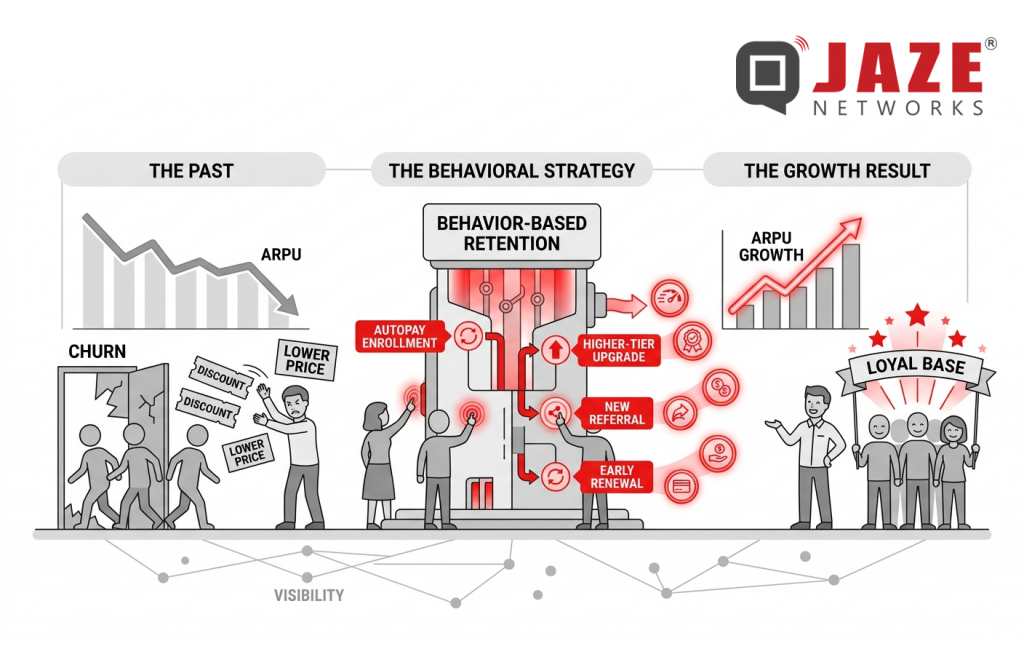
Discounts are the easiest way to hold onto subscribers — and the most expensive. ISPs that build revenue growth around behavior-based retention protect margins while increasing what each subscriber is worth over time. The telecom operators with the strongest ARPU growth are not the ones offering the lowest prices — they are the ones building loyalty into the subscriber journey from day one.
Growing revenue per subscriber used to mean upselling to bigger plans or bundling more services. That approach is losing steam. Subscribers are more price-sensitive than ever, and most ISPs in a given market offer similar packages at similar price points. Competing on price is a race with no clear winner.
The deeper problem: most ISPs chase ARPU growth through acquisition. When churn stays high, every new subscriber gained simply replaces one who left — and acquisition costs keep rising without any real gain in recurring revenue.
The smarter path is growing revenue within your existing base. Your highest-value subscribers are already on your network. The goal is to give them concrete reasons to stay, spend more, and move up the plan ladder — without dropping prices.
A behavior-based retention model shifts focus from reactive discounts to proactive engagement. Instead of offering a price cut when a subscriber threatens to leave, you reward actions that reinforce long-term commitment before that moment ever arrives.
These are not random perks — they map to specific moments in the subscriber journey where loyalty is built or lost.
Here are the behaviors worth incentivizing:
Each of these moments builds subscriber stickiness. Users who feel recognized for loyalty are more likely to stay, explore additional services, and refer new subscribers to your network. ARPU increases because subscribers voluntarily move up — not because they were pressured into it by a renewal call.
This approach does not require ongoing discounts. Perceived value — priority access, recognition, and perks tied to specific actions — drives the same behavior without eroding your margins.
Executing a retention-first ARPU strategy depends on having the right data at the right time. ISP operators need real-time visibility into:
An offer sent too late — or to the wrong subscriber — has no impact. Without lifecycle visibility, that is exactly what happens.
Without this wider view, retention stays reactive. You find out a subscriber is leaving when the cancellation request arrives — not three weeks earlier when there was still time to act.
Manual processes cannot keep pace. When your billing system does not connect to your support data, and your support data does not connect to provisioning records, the gaps between those systems are where subscribers fall through. The ISPs growing ARPU year over year run their entire operation from a single connected platform — not a collection of disconnected tools patched together with spreadsheets.
Jaze ISP Manager gives ISP operators a complete view of the subscriber lifecycle — from onboarding to renewal — in a single dashboard. Built-in billing automation tracks plan status and renewal dates, while the subscriber self-service portal and mobile app create ongoing engagement touchpoints between billing cycles. Operators can identify upgrade candidates, flag at-risk accounts, and act on retention signals before subscribers start looking elsewhere.
Click here to know more.
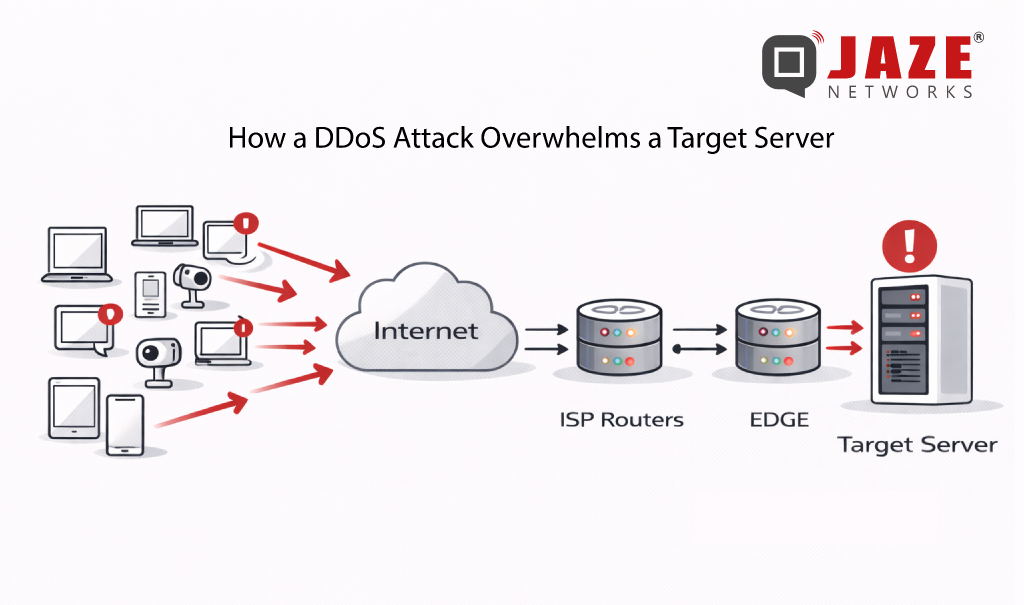
DDoS attacks are no longer rare, large-scale events. Volumetric floods exceeding hundreds of gigabits per second are now routine — and for ISPs, the damage isn’t just to the targeted subscriber. Congestion cascades across shared infrastructure, degrading service for everyone on the network. The question isn’t whether your network will face a DDoS attack. It’s how fast you can stop one.
BGP Flowspec is the answer most network operators are turning to — and for good reason. It combines the speed of BGP route propagation with the precision of granular traffic filtering, giving ISPs surgical control over attack traffic without disrupting legitimate users.
From Blunt to Precise: The Evolution Beyond RTBH
Before Flowspec, Remote Triggered Black Hole (RTBH) filtering was the go-to mitigation tool. RTBH works by routing all traffic destined for an attacked IP address to a null route — effectively dropping everything. It works fast, but it’s indiscriminate: legitimate traffic to that host gets silently discarded alongside the attack traffic.
BGP Flowspec (defined in RFC 5575 and extended in RFC 8955) was developed to solve this problem. Rather than blackholing an entire destination, Flowspec lets operators define detailed traffic rules based on multiple attributes simultaneously — and distribute those rules across the network in seconds via BGP.
What Makes BGP Flowspec Powerful
Flowspec rules can match traffic using a combination of:
• Source and destination IP addresses or prefixes
• Source and destination port numbers
• IP protocol (TCP, UDP, ICMP, etc.)
• Packet length and DSCP markings
• TCP flags (SYN, ACK, RST, etc.)
Once a rule is created, Flowspec propagates it to all BGP-peered routers — including upstream providers and transit peers — in real time. Instead of one appliance scrubbing traffic at a single point, the entire network perimeter reacts simultaneously.
Supported actions include rate-limiting specific traffic types, redirecting flows to scrubbing centers, tagging packets with DSCP values for QoS treatment, or dropping traffic outright. This flexibility makes Flowspec equally useful for volumetric UDP floods, TCP SYN attacks, and reflection/amplification attacks.
How Mitigation Works in Practice
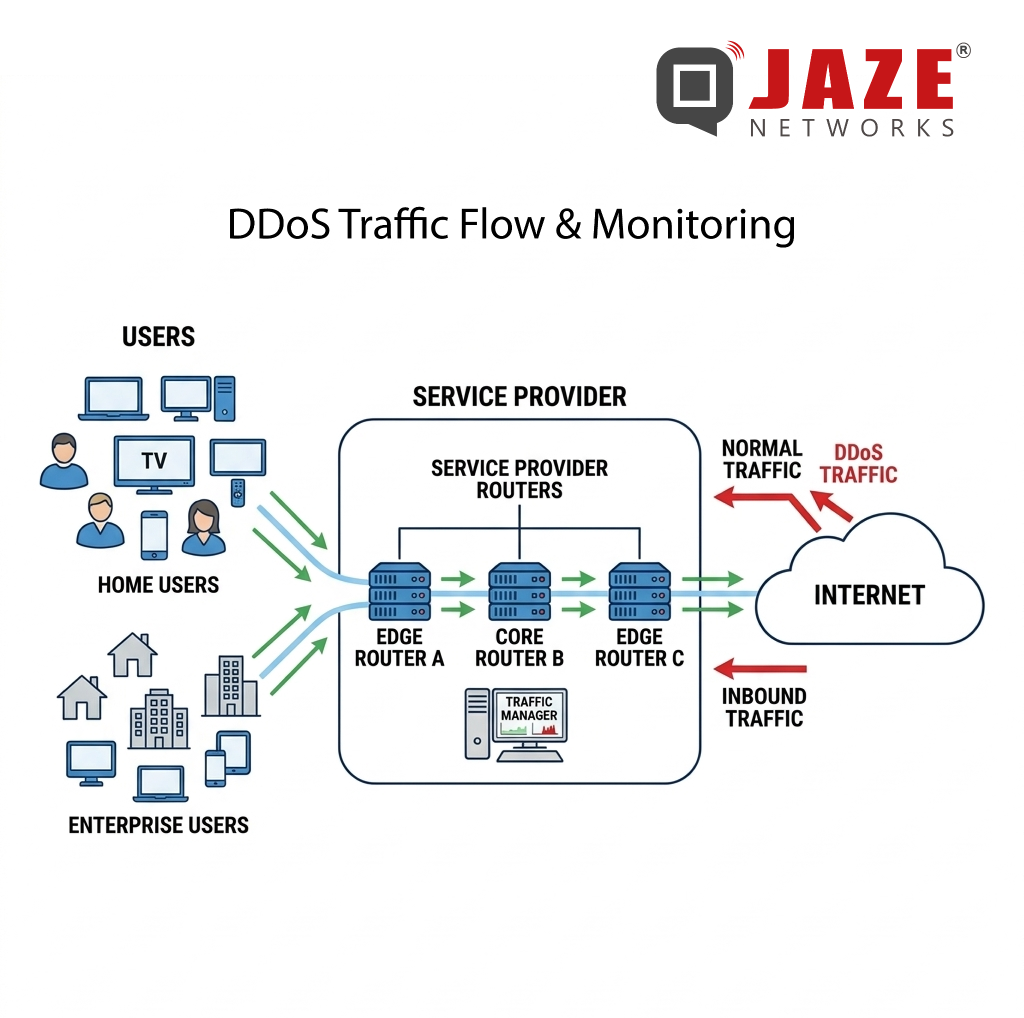
In a typical deployment, traffic telemetry — from NetFlow, IPFIX, or sFlow — is continuously analyzed by a detection system. When an attack signature is identified, the system automatically generates a Flowspec rule and announces it via BGP to all participating routers.
The entire cycle — detection, rule creation, propagation, enforcement — can complete in under 30 seconds. At attack scale, that speed is the difference between a 5-minute blip and a 45-minute outage.
Because Flowspec rules target specific traffic characteristics rather than IP addresses, legitimate users on the same subnet or hosting the same services are unaffected. The attack is blocked; normal traffic continues.
Vendor Support and Deployment Considerations
BGP Flowspec is supported across all major network equipment vendors — Cisco, Juniper, Huawei, Nokia, and Arista all implement it natively in their router operating systems. However, implementation depth varies: some platforms support only basic match criteria, while others support the full RFC 8955 attribute set.
For ISPs deploying Flowspec, key planning decisions include:
• Which routers will act as Flowspec clients (receiving and enforcing rules)
• Whether upstream transit providers also support Flowspec peering
• How detection thresholds are tuned to minimize false positives
• Whether mitigation is manual, semi-automated, or fully automated
Automated Flowspec deployment — where detection and rule announcement happen without human intervention — is now the standard approach for ISPs handling large subscriber bases. Manual processes are too slow when an attacker can saturate uplinks in seconds.
Flowspec and RTBH: Complementary, Not Competing
Flowspec doesn’t make RTBH obsolete. For attacks where the traffic source is clearly identified and the targeted IP has no legitimate inbound traffic (a server in maintenance, for example), RTBH remains faster to deploy and simpler to manage.
A mature ISP DDoS strategy uses both: RTBH for immediate, coarse-grained isolation and Flowspec for precise, sustained mitigation that preserves service availability for other subscribers on the same prefixes.
Jaze ISP Manager provides scalable IPFIX logging which can be integrated with DDoS protection systems for real-time DDoS detection and mitigation. In integration with BGP routers supporting RTBH and BGP Flowspec , ISPs can detect, respond to, and neutralise DDoS attacks before service is disrupted — keeping subscribers connected and SLAs intact.
Click here to see how Jaze ISP Manager helps in delivering scalable IPFIX logging services.
The Internet today works much like a vast and rapidly expanding city. Every device — whether it’s your phone, laptop, or home router — needs a unique address to send and receive information. For decades, this addressing system depended on IPv4, a 32-bit structure that was perfectly adequate when the Internet was small.
However, as more people, devices, and services connected online, IPv4’s supply of addresses could no longer keep up with the growth. This shortage triggered the introduction of temporary workarounds and long-term solutions — the most significant being Carrier-Grade NAT (CGNAT) and IPv6.
To extend the lifespan of IPv4, many Internet Service Providers (ISPs) adopted Carrier-Grade NAT. Instead of assigning every user a unique public IP address, CGNAT enables multiple customers to share a single IP. Each household receives a private internal address, and a translation layer maps internal traffic to the shared public IP.
This approach successfully delayed IPv4 exhaustion, but it introduced several limitations. CGNAT disrupts the Internet’s original end-to-end communication model by placing translation devices in the middle of user connections. As a consequence, certain applications struggle to function correctly, especially those that rely on direct connectivity.
Port forwarding becomes extremely difficult, sometimes impossible. This affects use cases such as home servers, online gaming, peer-to-peer applications, remote access setups, and more. Additionally, when multiple users share the same public IP, identifying the source of spam, abuse, or cyberattacks becomes far more complex. These challenges make CGNAT a useful but imperfect solution.
IPv6 was created as a permanent and future-proof alternative to IPv4. With its 128-bit address space, IPv6 provides an enormous pool of unique public addresses — enough for every device on Earth and many more.
Unlike CGNAT-based IPv4 setups, IPv6 supports true end-to-end connectivity. Every device can be globally reachable without relying on NAT layers or port mapping workarounds. This leads to cleaner network designs, lower complexity, improved reliability, and better performance for applications that require direct communication.
Despite its advantages, IPv6 adoption has been slower than expected. Many networks still run primarily on IPv4 infrastructure, and not all devices or applications fully support IPv6. In some cases, IPv6 is deployed using the same philosophies as IPv4 NAT, reducing the benefits of the protocol due to outdated design assumptions.
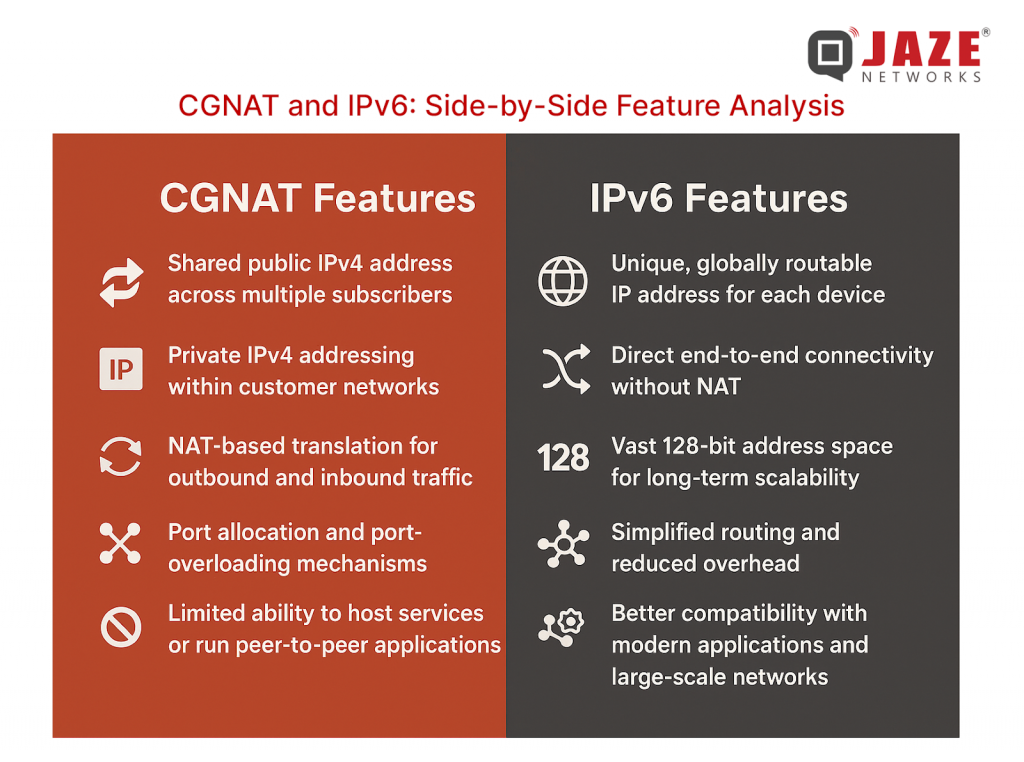
The differences between CGNAT and IPv6 become clear when examining common real-world scenarios:
In essence, CGNAT introduces friction for modern, interactive Internet use cases, while IPv6 aligns naturally with today’s connectivity needs.
Migrating an entire global Internet ecosystem is complex. Several factors slow down IPv6 deployment:
To move forward, ISPs must embrace native IPv6 routing instead of leaning on NAT-based stopgaps. Device manufacturers and service providers should treat IPv6 compatibility as mandatory, not optional. Developers and technical professionals need to adopt IPv6-first design principles to ensure smooth interoperability.
CGNAT has played an important role in extending the life of IPv4, but its limitations are increasingly apparent. It complicates connectivity, affects performance, reduces transparency, and restricts how users interact with the Internet.
IPv6, by contrast, provides scalability, efficiency, and true end-to-end communication — all essential for the modern digital ecosystem. While the transition is ongoing, IPv6 represents the Internet’s long-term foundation.
For users who rely on hosting, gaming, remote access, or advanced networking features, choosing an ISP that offers robust, native IPv6 routing can significantly improve their experience. For technology creators and providers, adopting IPv6-first development ensures long-term compatibility and reliability.
Ultimately, the future of the Internet is built on abundant addressing, simplified routing, and open connectivity — the principles that IPv6 was designed to deliver.
Jaze ISP Manager offers comprehensive solutions to help ISPs transition seamlessly to IPv6 with integration with all major BNG providers ensuring robust network performance and future-proof connectivity.
API (Application Programming Interface) integration allows different software applications to exchange information seamlessly—and that matters a lot for Internet Service Providers (ISPs).
Consider this scenario: A new subscriber signs up via your mobile app, their account is created in your billing system, the network gateway provisions their service, and the CRM logs the sale—all in real time. Without API integration, this flow involves manual steps, delays, errors, and lots of overhead. With it, everything happens automatically.
For ISPs, that means faster onboarding, fewer customer issues, lower operational costs, and better scalability. As access technologies diversify (fiber, WiFi 6/7, fixed-wireless, IPTV, OTT), the number of connected systems grows—but so does the need for smooth, automated data flow. API integration isn’t just “nice to have”—it’s a competitive necessity.

At its simplest: application A sends a request, application B responds. Under the hood, there are a few key elements:
In practical terms for ISPs: your customer portal might call an API to create a subscriber record; your billing engine might call another API to update plan status; your network controller might call an API to configure network access. Each of these steps is automated and connected.
For ISPs, choosing the right method depends on scale, variety of systems, and how fast you need to move. As your ecosystem grows (multiple access types, value-added services, OTT bundles), an iPaaS-style approach tends to make the most sense.
API integrations offer a wide range of benefits—here are some key use cases:
Delayed or fragmented integrations cost ISPs far more than just slow processes. They cost growth, customer satisfaction, and innovation. In today’s broadband-hungry world, seamless API integration is no longer optional—it’s mission-critical.
If you’re an ISP looking to scale, diversify services, and reduce operational overhead, make API integration a key pillar of your strategy. It’s the connective tissue that lets all your tools—billing, network, CRM, OTT, payments—work as one.

Click here to learn more.
The broadband era has surged ahead. With streaming, IoT, remote work and fixed-wireless access all increasing, the role of the Broadband Network Gateway (BNG) is more critical than ever. What used to be a fairly straightforward gateway for customer broadband access is now the core pivot in ISP networks — managing subscriber sessions, enforcing policy, enabling new services.
As ISPs and software providers look ahead, it’s timely to review how BNG access models are evolving — what the new models are, why they matter, and what to consider when redefining your architecture.
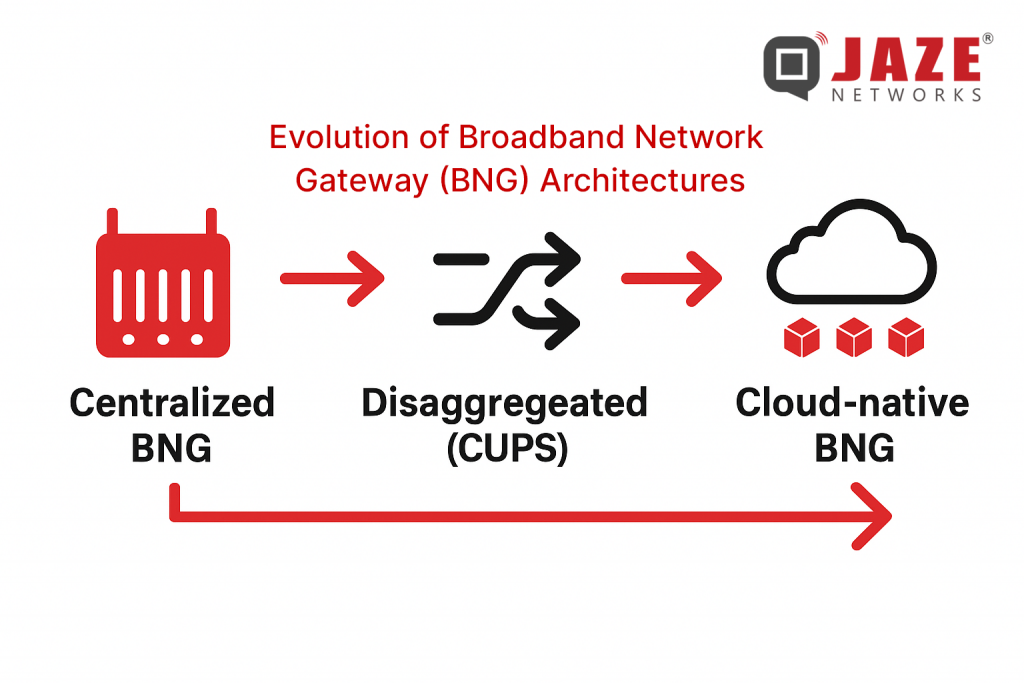
Older BNG architectures were largely built around these characteristics:
However, several shifts are making this traditional model less effective:
Because of this, ISPs must rethink the BNG — the access model, deployment location, and software vs hardware trade-offs.
Here are several access models emerging in the BNG space — useful to understand for product positioning, network architecture or software service strategy:
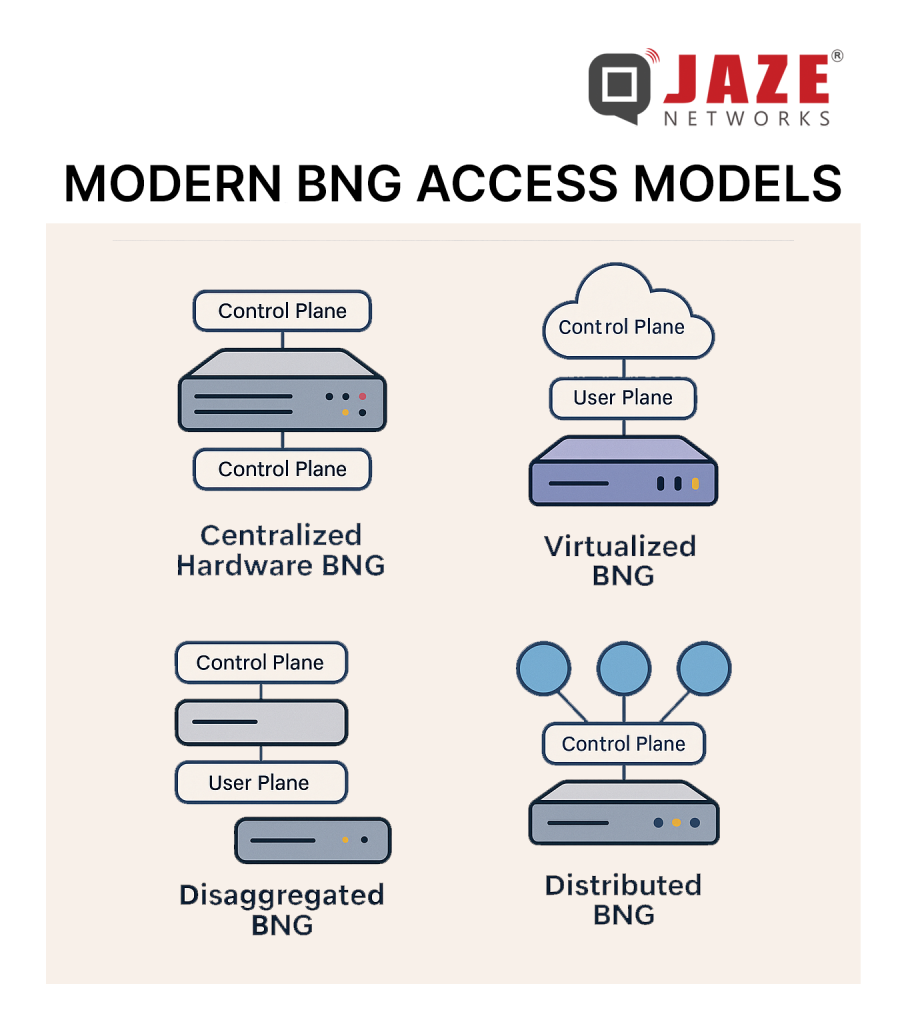
From the vantage of an ISP or a software vendor for ISPs, understanding these access models gives you strategic insight:
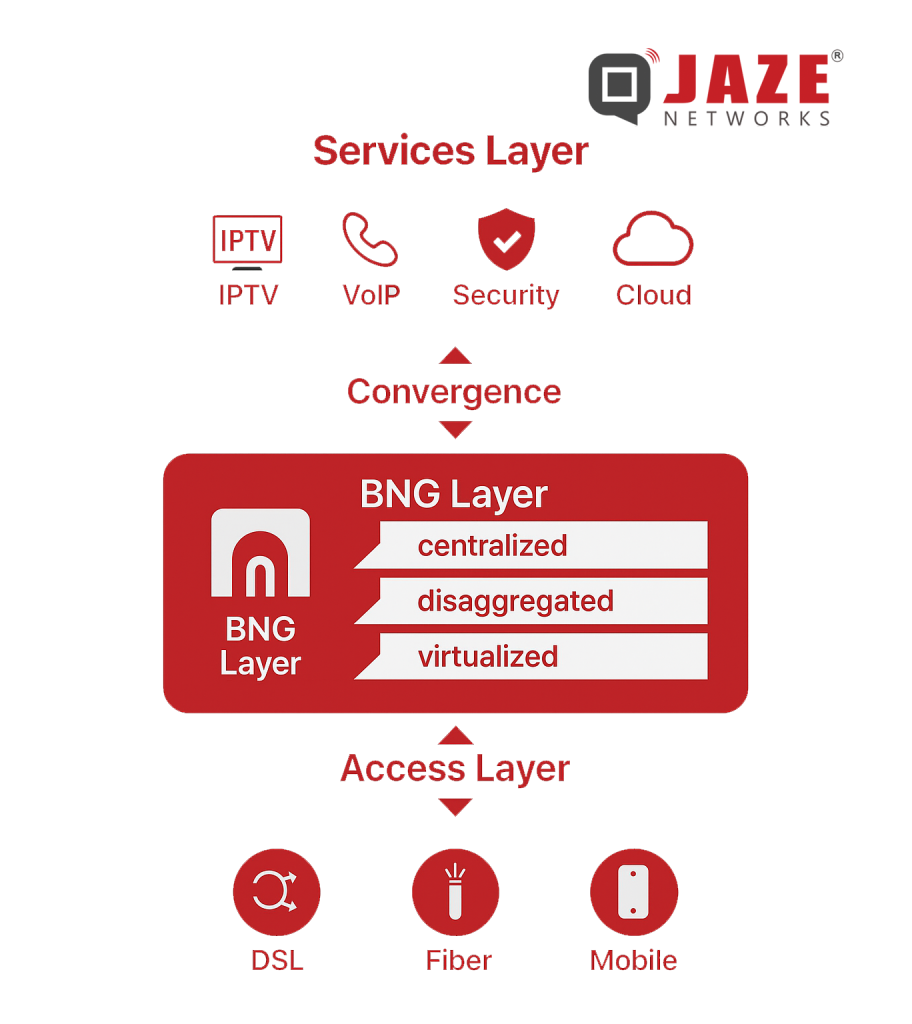
Cost efficiency & scalability: Virtualised/disaggregated BNGs reduce hardware dependency, enable scaling with demand, lower OPEX.
Service agility: Faster introduction of new pricing tiers, service bundles, new access types (FWA, WiFi) — software control matters.
Operational simplicity: Central control plane means fewer edge-appliances to manage; disaggregation means upgrades, scaling becomes less disruptive.
Edge performance & user experience: With distributed user plane, latency and backhaul loads are reduced, supporting high-quality real-time services.
Convergence & future-proofing: Fixed + wireless + multi-access handled by common architecture means ISPs are better positioned for 5G, IoT, edge-services.
Here’s a quick checklist for ISPs and software vendors to assess their BNG strategy:
Subscriber scale & growth: Can the model scale out linearly with subscriber growth and traffic loads?
Access diversity: Will your access types (fiber, FWA, WiFi) be supported under the model?
Control vs user plane location: How decoupled are they? Where will user plane be located for optimal performance?
Software orchestration & automation: Are provisioning, policy, subscriber lifecycle fully automated?
Service agility: How quickly can new tariff plans, bundles, access services be introduced?
Hardware dependency: What is the capex/opex trade-off? Can you move toward software-defined alternatives?
Edge readiness & latency: If you support real-time or OTT services, is your user plane close enough to the edge?
Vendor ecosystem & integration: Does the solution support open interfaces, multi-vendor, easier upgrades?
Whether you go for a centralised appliance, a virtualised cloud-native gateway, a disaggregated CUPS architecture or an edge-distributed model — the common theme is flexibility, software-first, multi-access readiness and subscriber-centric policy control. For ISPs and the SaaS companies that serve them, aligning your strategy (and your software platform) with these modern BNG access models means you’re not just keeping up — you’re positioning for next-gen broadband services, better user experience and operational advantage.
Jaze ISP Manager offers seamless integration with leading BNG/BRAS platforms — enabling ISPs to manage subscriber sessions, enforce policy across all access types, automate provisioning and billing, and monitor network health from one unified dashboard. Whether you are operating a traditional hardware BNG, moving to virtualised models or adopting a distributed edge architecture, Jaze ISP Manager supports the full lifecycle: from onboarding to churn, with scalability built in.
Click here to learn more.
When we talk about internet speed, most people instantly think about how fast they can download movies, stream videos, or browse social media. But in today’s world, it’s not just about downloading anymore — upload speed is equally important.
As we step into 2025–2026, when remote work, cloud storage, video creation, and smart devices dominate daily life, upload speed can make or break your digital experience.
Let’s understand why it matters — and how it affects almost everything you do online.
What Exactly Is Upload Speed?
Upload speed refers to how quickly you can send data from your device to the internet.
It’s measured in megabits per second (Mbps), just like download speed.
Every time you:
—you’re using your upload bandwidth.
If your upload speed is low, even a strong download connection can feel sluggish or unstable during these tasks.
1. The Era of Remote Work & Online Collaboration
Work-from-home and hybrid models are here to stay. Every video meeting, shared file, or cloud document relies on your upload connection.
A slow upload speed means blurry video calls, lagging audio, and constant “reconnecting…” messages — not ideal when you’re presenting to clients or attending classes online.
2. Social Media & Content Creation Boom
From influencers to small business owners, everyone is uploading photos, reels, and videos daily.
With 4K and 8K becoming standard, files are huge. High upload speed ensures your videos go live faster — and without frustrating delays.
3. Cloud Storage & Backup
We’re moving away from storing everything on devices. Automatic backups to Google Photos, iCloud, and OneDrive constantly use upload bandwidth.
If upload speeds are low, backups slow down, sync fails, and your data may remain outdated.
4. Smart Homes & IoT Devices
Cameras, sensors, and voice assistants send continuous data to cloud servers.
When upload bandwidth is insufficient, you’ll see camera feed delays, failed device syncs, or unreliable smart automation.
5. Gaming & Live Streaming
Gamers know the pain of lag.Online gaming and live streaming both rely on strong upstream connections — every action, every frame, every voice chat goes out through your upload channel.
Higher upload speeds mean smoother gameplay and crystal-clear streams.
| Online Activity | Recommended Upload Speed |
| Video calls (Zoom, Meet) | 3–5 Mbps |
| Cloud backups | 10–20 Mbps |
| Online gaming | 5–10 Mbps |
| 4K live streaming | 20–25 Mbps |
| Uploading large media files | 25 Mbps and above |
If multiple devices or users share the same connection, you’ll need even higher speeds for a seamless experience.
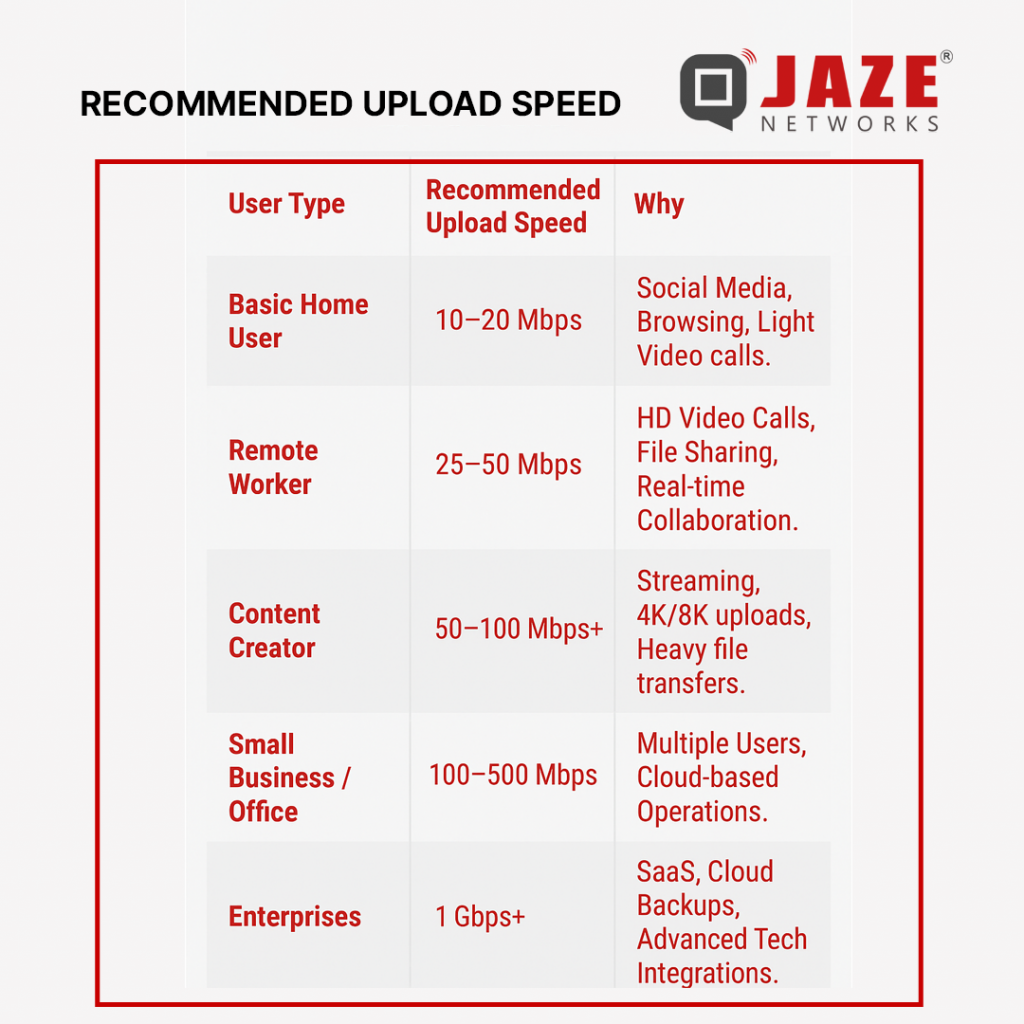
India’s internet usage pattern is shifting fast. Earlier, most users were consumers of content — watching, downloading, or streaming.
But now, millions are creators — students uploading projects, professionals hosting webinars, and entrepreneurs managing online stores.
Unfortunately, many broadband plans in India still prioritize download speeds and offer much lower uploads (often just 10–20% of download rates).
That imbalance is slowly changing, as fiber networks and symmetrical connections become mainstream.
Traditional broadband (like copper or DSL) can’t handle equal upload and download speeds.
But fiber-to-the-home (FTTH) connections deliver symmetrical speeds — meaning if you get 200 Mbps download, you also get 200 Mbps upload.
This makes a huge difference for:
Fiber technology is the backbone of India’s digital growth — and it’s finally bridging the upload gap.
As India embraces a creator-driven digital economy, upload speed is no longer secondary — it’s essential.
Whether you’re working from home, managing an online business, or sharing your creativity with the world, faster upload speeds ensure smoother, smarter, and more reliable connectivity.
Jaze ISP Manager helps ISPs by optimising bandwidth delivery and provide a seamless experience to subscribers. This ensures stable upload speeds for users, reduces congestion during peak hours, and improves performance for video calls, cloud backups, and live streaming. In short, it gives ISPs the tools to maintain reliable upstream performance for their customers. Click here to know more
The demand for high-speed internet is growing exponentially, fueled by the rise of 8K streaming, IoT, and cloud applications. Traditional fiber rollouts, while effective, can be costly and time-consuming, especially in suburban and semi-urban areas. Enter MicroPoPs (Micro Point of Presence)—a game-changer for ISPs looking to maximize fiber efficiency while expanding network reach.
What Are MicroPoPs?
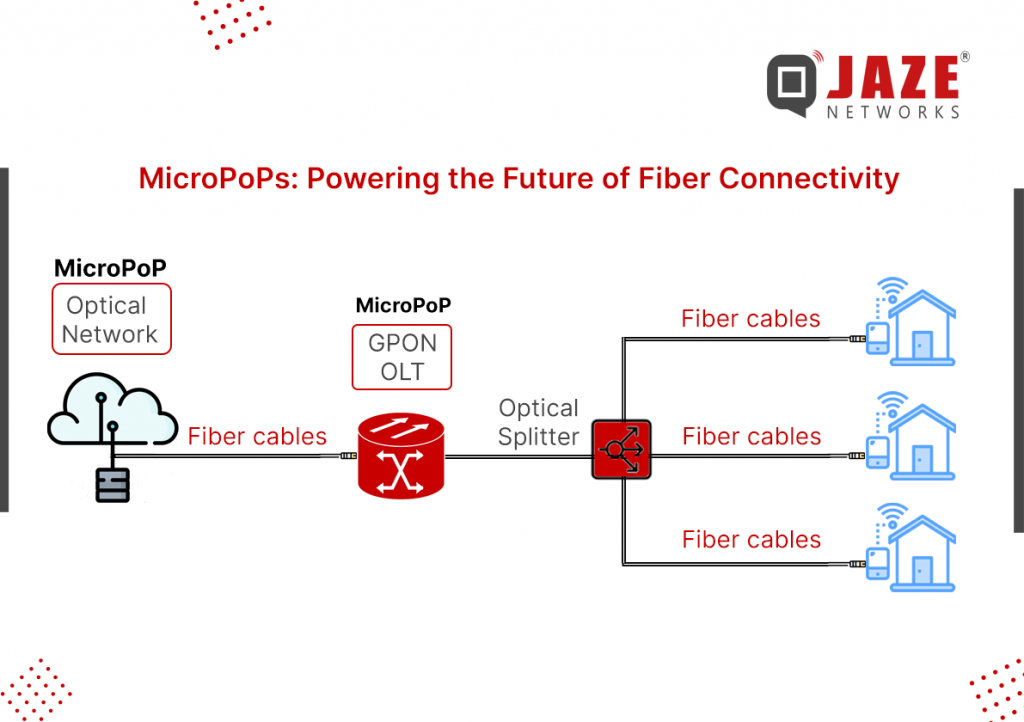
MicroPoPs are small-scale, fiber-fed network nodes that act as local distribution points for high-speed broadband services. Unlike conventional fiber-to-the-home (FTTH) deployments that extend fiber all the way to individual residences, MicroPoPs bring fiber close to end-users while leveraging high-capacity wireless or last-mile fiber solutions to complete the connection.
The Role of MicroPoPs in ISP Networks
MicroPoPs are strategically placed within a community to deliver gigabit-capable speeds over a short distance. By deploying MicroPoPs, ISPs can efficiently utilize their fiber backbone while minimizing expensive trenching and infrastructure costs.
Here’s how they fit into modern ISP architectures:
Fiber Backbone Integration – MicroPoPs are connected to an ISP’s core network via regional fiber hubs or aggregation points, ensuring high-speed data transmission.
High-Bandwidth Distribution – From a MicroPoP, ISPs can deploy Fiber-to-the-Curb (FTTC), Fiber-to-the-Building (FTTB), or hybrid fiber-wireless models to serve multiple subscribers.
Reduced Latency & Congestion – By placing data processing closer to users, MicroPoPs improve network efficiency, reducing latency and backhaul congestion.
Key Benefits of MicroPoPs for ISPs
1. Cost-Effective Network Expansion
Deploying FTTH can be prohibitively expensive in low-density regions. MicroPoPs reduce fiber rollout costs while maintaining ultra-fast speeds by serving multiple customers from a single node.
2. Faster Deployment Times
Unlike full-scale fiber deployments, which require extensive civil work, MicroPoPs can be installed quickly using existing infrastructure, significantly reducing time-to-market.
3. Scalability & Future-Proofing
MicroPoPs allow ISPs to scale their networks incrementally. They can start with targeted deployments in high-demand areas and expand based on user adoption.
4. Improved Service Reliability
By decentralizing data distribution, ISPs can enhance redundancy and reliability, ensuring consistent performance during peak usage.
Deployment Considerations for ISPs:
While MicroPoPs offer significant advantages, successful deployment requires careful planning.
Key factors to consider include:
Backhaul Capacity: Ensuring sufficient fiber bandwidth to support high-speed connectivity at each MicroPoP location.
Geographic Placement: Optimal positioning within communities to maximize coverage and minimize last-mile delivery costs.
Regulatory Compliance: Adhering to local infrastructure and right-of-way regulations.
Power & Cooling: Implementing efficient power and cooling solutions for remote MicroPoP units.
The Future of ISP Networks with MicroPoPs
As ISPs strive to deliver multi-gigabit speeds and support the growing number of connected devices, MicroPoPs will play a crucial role in shaping the future of broadband infrastructure. By integrating next-gen technologies like XGS-PON, 5G backhaul, and edge computing, ISPs can create robust, scalable networks that meet the ever-increasing demands of modern consumers.
MicroPoPs represent a strategic approach to fiber network densification, enabling ISPs to offer high-speed internet with cost efficiency and rapid scalability. By leveraging MicroPoPs, service providers can bridge the digital divide, enhance customer experience, and stay ahead in an increasingly competitive market.
Deploying and managing MicroPoPs requires a robust and scalable inventory management solution. Jaze ISP Manager simplifies MicroPoP management by keeping track of inventory at each location.
You can also add additional information to subscribers to track which subscriber is connected to which MircoPoP for easier identification and troubleshooting.
In today’s connected world, choosing the right internet service is crucial. With various options available, it can be challenging to determine which one best suits your needs. Two popular choices are fiber and satellite internet. Each has its unique advantages and disadvantages, making them suitable for different situations. Let’s dive into the details to help you make an informed decision.
Fibre internet, powered by fiber-optic cables, is known for its exceptional speed and reliability. Here’s a breakdown of its benefits and challenges:
Satellite internet, as the name suggests, relies on satellites to beam internet signals to users on the ground. While it doesn’t match the speed and reliability of fibre, it has its own advantages, especially in remote or underserved areas.
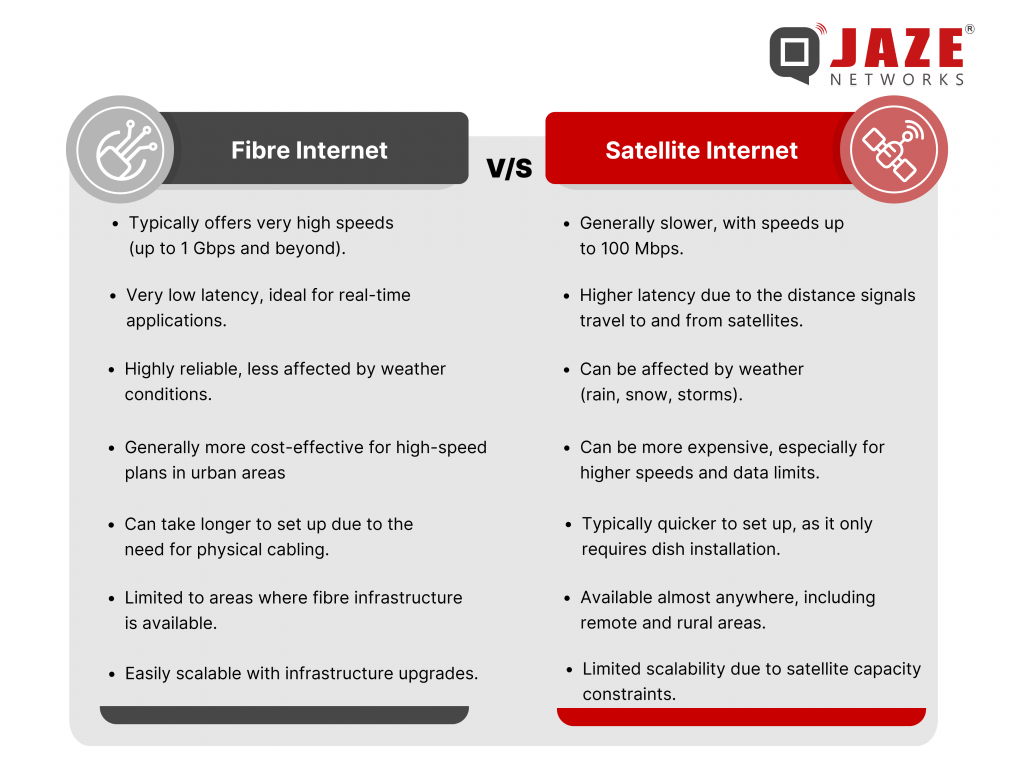
The choice between fibre and satellite internet depends largely on your location, usage needs, and budget.
Despite the growing market of Satellite Internet, fiber based Internet is here to stay. Fiber based ISPs are more reliable with faster speeds and lower latency which provide a better customer experience. ISPs need software to manage their business operations and automate processes.
Jaze ISP Manager integrates with all leading BNG providers to provide scalable and enterprise-grade AAA, BSS and IPDR solutions for ISPs of all sizes. Click here to learn more.