
Jaze Networks
  • Jaze ISP Manager
    AAAAuthentication and policyBillingTriple-play billing and paymentsCRMLeads, helpdesk and inventoryFranchise ManagementRevenue sharing and split settlementIPFIXFlow and session logsTR-069Zero-touch provisioning
    Jaze Access Manager
    User OnboardingFrom your user repository, or onboardedAuthentication802.1X and captive portalPolicy EnforcementUsage, SSID and MAC, vendor attributesRSSOThe user's identity, at the firewall
    Jaze Cloud Wi-Fi
    Centralized ControlMulti-location Wi-Fi managementFlexible Login WorkflowsConfigure flexible guest access
    Jaze FiberMap
    GIS Network MappingMap the fiber plant on the groundAI-Powered Fault DetectionLocate breaks before the calls start
  • Industries we serve

    TelcosConnect and manage network operationsISPsRun subscriber services from one platformHospitalityGuest Wi-Fi for hotels and resortsEducationCampus-wide managed accessEnterprisesPrivate networks and branch accessPublic Wi-FiCity and venue-scale hotspotsRetailMulti-site connectivity and analytics
  • DocumentationGuides and configurationAPIREST API referenceGetting startedIntroduction and dashboard tourTech newsIndustry and product writingFAQCommon questions, answeredCase studiesDeployments in the fieldReference architectureWhere Jaze sits in a networkIntegrationsRouters, gateways and platformsISO certificationQuality, security and service standards
  • Pricing
  • Contact
+91 99620 60333Log inSupport
Ctrl K
  • Getting started

    • Introduction
    • Dashboard Overview
  • Sub zones

    • Creating a sub-zone
    • Switching between sub-zones
    • View all zones
    • Apply to all sub-zones
  • Bandwidth templates

    • Creating bandwidth templates
    • Import-Export bandwidth template
  • Usage packages

    • Creating usage packages
    • Import-Export usage packages
  • Fup packages

    • Creating FUP templates
  • User management

    • Creating a group
    • Adding a user
    • User group actions
    • User group management shortcuts
    • CAF generation
    • Search Users
  • User operations

    • User details
    • User states
  • Billing

    • Billing types
    • Creating billing products
    • Creating billing plans
    • Configuring billing notifications
    • Billing templates
    • Viewing all orders
    • Viewing all invoices
    • Viewing paid invoices
    • Viewing payments
    • Managing TDS payments
    • Managing pay-as-you-go users
    • Managing scheduled renewals
    • Managing payment collection requests
    • Pin billing
    • Billing configuration
    • Billing diagnostics
  • Payment collection management

    • Defining areas
    • Mapping admins
    • Viewing users
    • Collection approval
    • Managing admin-wise collection
  • Lead management

    • Lead management
    • Lead configuration
    • Lead assignment
    • Completed and dropped leads
  • Captive portal

    • Configuration
    • Blocking MAC address
    • Captive portal customization
    • User portal customization
    • User registration page
  • Nas router configuration

    • Adding router
    • Adding IP ranges
    • Adding CPE devices
  • Helpdesk

    • Helpdesk dashboard
    • Ticketing configuration
    • SLA setup
    • Advanced ticketing setup
    • Raising tickets
    • Managing tickets
  • Announcements

    • Sending announcements
    • Configuring triggers
    • Displaying messages to subzones
  • External integration

    • SMS
    • Email
    • Payment gateway
    • FTP
    • Google drive
    • One signal
    • Webhooks
  • Inventory management

    • Creating stock items
    • Managing vendors
    • Managing locations
    • Managing stock
    • Managing goods in use
  • Task management

    • Enabling approval tasks
    • Managing tasks
  • Logs

    • Viewing logs
  • Admin management

    • Creating admin roles
    • Admin classification
    • Creating admin accounts
  • Franchisee management

    • Franchisee configuration
    • Franchisee management
    • Cash transactions
    • Franchisee statement
    • Franchisee dashboard
    • Franchisee payments
  • Additional settings configuration

    • General configuration
    • Express configuration
    • Billing settings
    • Billing address
    • Router visibility
    • API access
    • Billing period
    • Invoice prefix
    • Payment prefix
    • Username prefix
    • Table header configuration
    • Admin user groups control
    • Approval tasks
    • Tag payment gateway
    • Pay as you go settings
    • Custom rules settings
    • User fields
    • Additional fields
    • Dashboard configuration
    • Customerportal URL
    • Franchisee settings
    • Delete subzone
    • Activate Deactivate subzone
    • SMS management
    • Payment collection
  • Reporting

    • Report type
    • Report scheduling

Inventory management

Managing vendors

The Vendor Management section lets you create all the vendors from whom you purchase your stock.
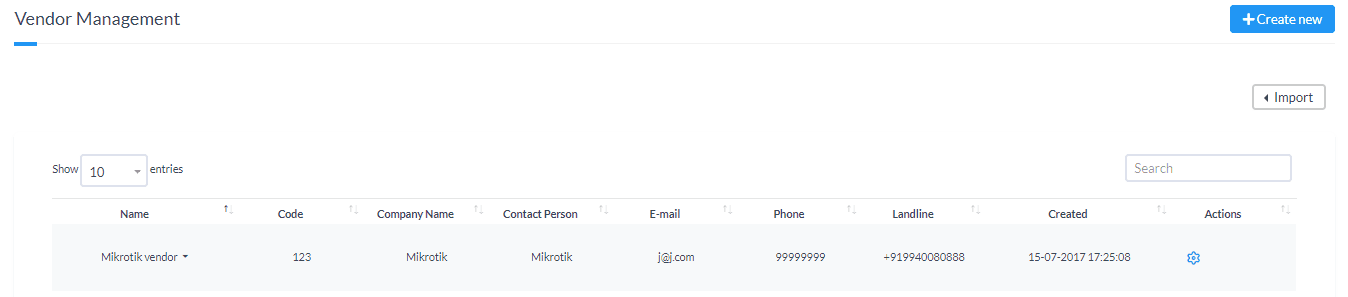
Managing vendors
Previous

Creating stock items

Next

Managing locations

Jaze Networks

ISP management software: subscriber management, AAA, billing and network operations for internet service providers worldwide.

  • [email protected]
  • +91-99620 60333
  • 66 Raju Nagar Main Road, Thuraipakkam, Tamil Nadu 600097

Jaze ISP Manager

  • AAA
  • Billing
  • CRM
  • Franchise Management
  • IPFIX
  • TR-069

Jaze Access Manager

  • User Onboarding
  • Authentication
  • Policy Enforcement
  • RSSO

Jaze Cloud Wi-Fi

  • Centralized Control
  • Flexible Login Workflows

Jaze FiberMap

  • GIS Network Mapping
  • AI-Powered Fault Detection

Solutions

  • Telcos
  • ISPs
  • Hospitality
  • Education
  • Enterprises
  • Public Wi-Fi
  • Retail

Resources

  • Documentation
  • API
  • Tech news
  • FAQ
  • Case studies
  • Reference architecture
  • Integrations
  • ISO certification
  • Support

© 2026 Jaze Networks Pvt Ltd. All Rights Reserved.

Privacy PolicyTerms of ServiceCancellation & Refund Policy
Prefer to talk?+91 99620 60333