
Jaze Networks
  • Jaze ISP Manager
    AAAAuthentication and policyBillingTriple-play billing and paymentsCRMLeads, helpdesk and inventoryFranchise ManagementRevenue sharing and split settlementIPFIXFlow and session logsTR-069Zero-touch provisioning
    Jaze Access Manager
    User OnboardingFrom your user repository, or onboardedAuthentication802.1X and captive portalPolicy EnforcementUsage, SSID and MAC, vendor attributesRSSOThe user's identity, at the firewall
    Jaze Cloud Wi-Fi
    Centralized ControlMulti-location Wi-Fi managementFlexible Login WorkflowsConfigure flexible guest access
    Jaze FiberMap
    GIS Network MappingMap the fiber plant on the groundAI-Powered Fault DetectionLocate breaks before the calls start
  • Industries we serve

    TelcosConnect and manage network operationsISPsRun subscriber services from one platformHospitalityGuest Wi-Fi for hotels and resortsEducationCampus-wide managed accessEnterprisesPrivate networks and branch accessPublic Wi-FiCity and venue-scale hotspotsRetailMulti-site connectivity and analytics
  • DocumentationGuides and configurationAPIREST API referenceGetting startedIntroduction and dashboard tourTech newsIndustry and product writingFAQCommon questions, answeredCase studiesDeployments in the fieldReference architectureWhere Jaze sits in a networkIntegrationsRouters, gateways and platformsISO certificationQuality, security and service standards
  • Pricing
  • Contact
+91 99620 60333Log inSupport
Ctrl K
  • Getting started

    • Introduction
    • Dashboard Overview
  • Sub zones

    • Creating a sub-zone
    • Switching between sub-zones
    • View all zones
    • Apply to all sub-zones
  • Bandwidth templates

    • Creating bandwidth templates
    • Import-Export bandwidth template
  • Usage packages

    • Creating usage packages
    • Import-Export usage packages
  • Fup packages

    • Creating FUP templates
  • User management

    • Creating a group
    • Adding a user
    • User group actions
    • User group management shortcuts
    • CAF generation
    • Search Users
  • User operations

    • User details
    • User states
  • Billing

    • Billing types
    • Creating billing products
    • Creating billing plans
    • Configuring billing notifications
    • Billing templates
    • Viewing all orders
    • Viewing all invoices
    • Viewing paid invoices
    • Viewing payments
    • Managing TDS payments
    • Managing pay-as-you-go users
    • Managing scheduled renewals
    • Managing payment collection requests
    • Pin billing
    • Billing configuration
    • Billing diagnostics
  • Payment collection management

    • Defining areas
    • Mapping admins
    • Viewing users
    • Collection approval
    • Managing admin-wise collection
  • Lead management

    • Lead management
    • Lead configuration
    • Lead assignment
    • Completed and dropped leads
  • Captive portal

    • Configuration
    • Blocking MAC address
    • Captive portal customization
    • User portal customization
    • User registration page
  • Nas router configuration

    • Adding router
    • Adding IP ranges
    • Adding CPE devices
  • Helpdesk

    • Helpdesk dashboard
    • Ticketing configuration
    • SLA setup
    • Advanced ticketing setup
    • Raising tickets
    • Managing tickets
  • Announcements

    • Sending announcements
    • Configuring triggers
    • Displaying messages to subzones
  • External integration

    • SMS
    • Email
    • Payment gateway
    • FTP
    • Google drive
    • One signal
    • Webhooks
  • Inventory management

    • Creating stock items
    • Managing vendors
    • Managing locations
    • Managing stock
    • Managing goods in use
  • Task management

    • Enabling approval tasks
    • Managing tasks
  • Logs

    • Viewing logs
  • Admin management

    • Creating admin roles
    • Admin classification
    • Creating admin accounts
  • Franchisee management

    • Franchisee configuration
    • Franchisee management
    • Cash transactions
    • Franchisee statement
    • Franchisee dashboard
    • Franchisee payments
  • Additional settings configuration

    • General configuration
    • Express configuration
    • Billing settings
    • Billing address
    • Router visibility
    • API access
    • Billing period
    • Invoice prefix
    • Payment prefix
    • Username prefix
    • Table header configuration
    • Admin user groups control
    • Approval tasks
    • Tag payment gateway
    • Pay as you go settings
    • Custom rules settings
    • User fields
    • Additional fields
    • Dashboard configuration
    • Customerportal URL
    • Franchisee settings
    • Delete subzone
    • Activate Deactivate subzone
    • SMS management
    • Payment collection
  • Reporting

    • Report type
    • Report scheduling

Helpdesk

Managing tickets

The Tickets can be managed from the Tickets tab. You can filter tickets by using the filter option on the left sidebar to search for a particular ticket.
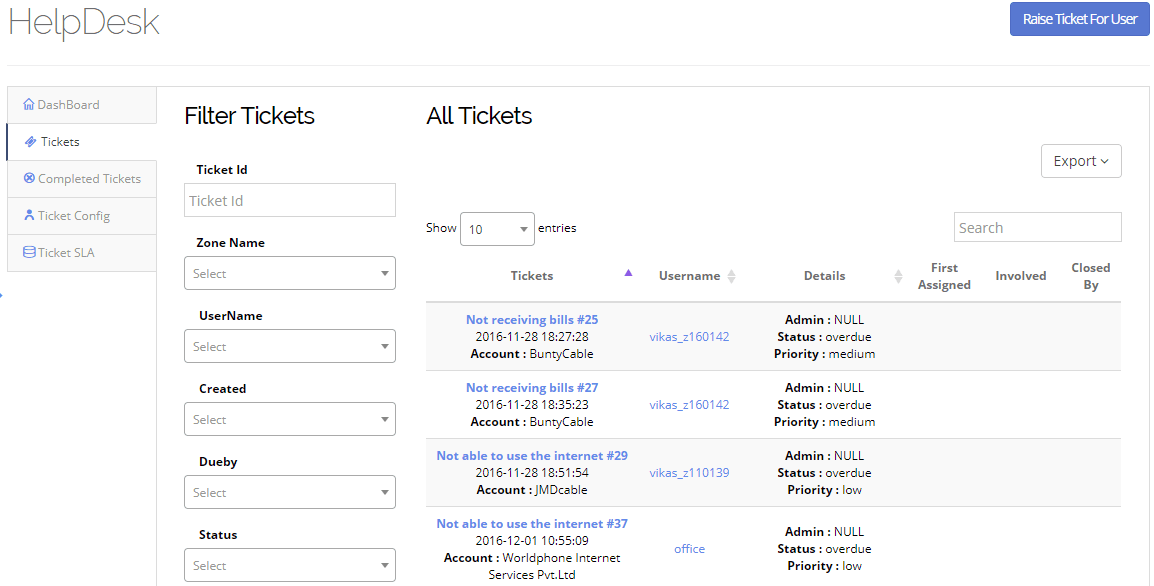
Managing tickets
Previous

Raising tickets

Next

Sending announcements

Jaze Networks

ISP management software: subscriber management, AAA, billing and network operations for internet service providers worldwide.

  • [email protected]
  • +91-99620 60333
  • 66 Raju Nagar Main Road, Thuraipakkam, Tamil Nadu 600097

Jaze ISP Manager

  • AAA
  • Billing
  • CRM
  • Franchise Management
  • IPFIX
  • TR-069

Jaze Access Manager

  • User Onboarding
  • Authentication
  • Policy Enforcement
  • RSSO

Jaze Cloud Wi-Fi

  • Centralized Control
  • Flexible Login Workflows

Jaze FiberMap

  • GIS Network Mapping
  • AI-Powered Fault Detection

Solutions

  • Telcos
  • ISPs
  • Hospitality
  • Education
  • Enterprises
  • Public Wi-Fi
  • Retail

Resources

  • Documentation
  • API
  • Tech news
  • FAQ
  • Case studies
  • Reference architecture
  • Integrations
  • ISO certification
  • Support

© 2026 Jaze Networks Pvt Ltd. All Rights Reserved.

Privacy PolicyTerms of ServiceCancellation & Refund Policy
Prefer to talk?+91 99620 60333